🔴 Read This First · China Ticket Reality
You Almost Never Buy Tickets at the Gate
China runs attractions on a real-name reservation system. Unlike Europe or the US, most popular spots in China don't sell walk-up tickets — you must book a timed slot online, with your passport, before you arrive. Here's what that means for you:
- 🪪
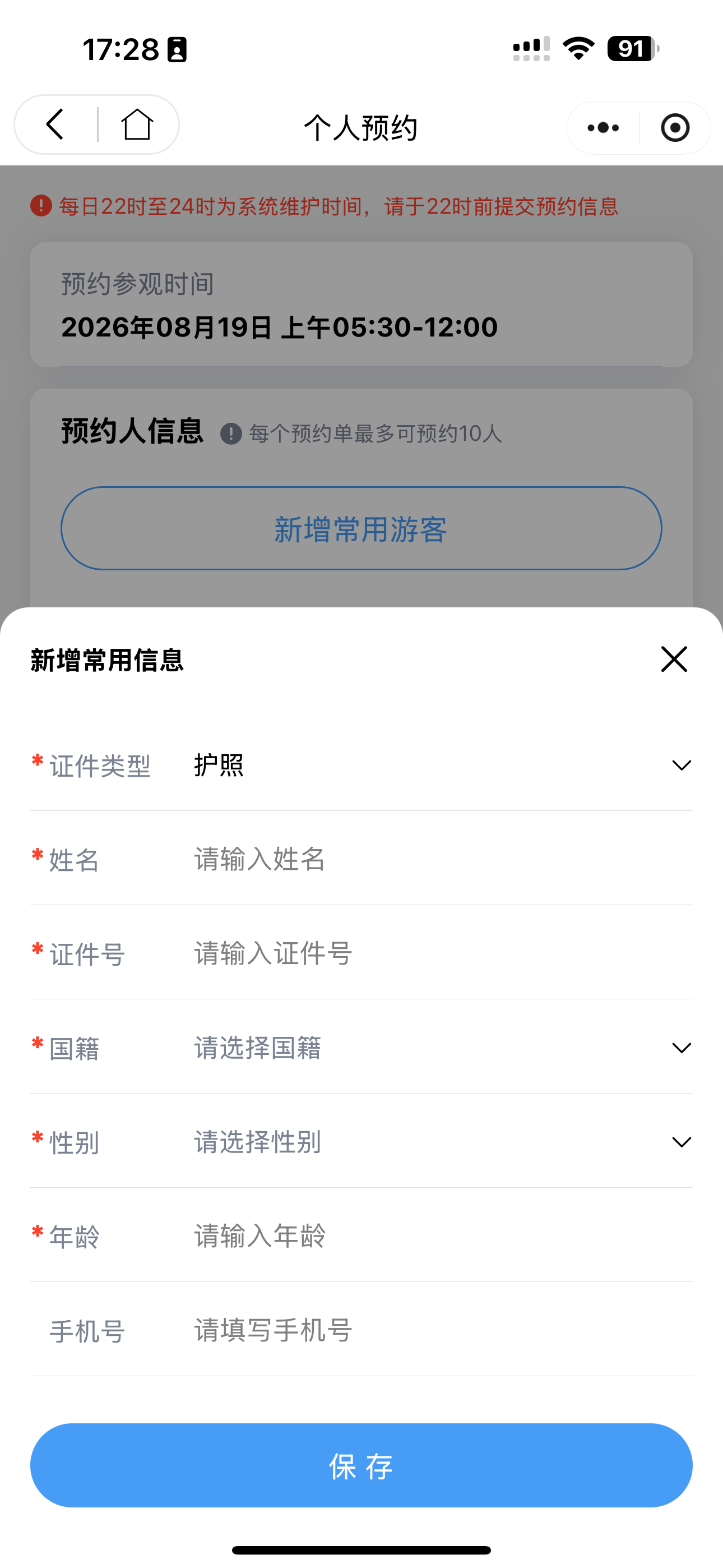
Passport is your ticket. Every booking asks for your passport number and name exactly as printed. No passport, no entry — even if you "have a ticket."
- 📉
Daily caps sell out fast. The Forbidden City releases only ~40,000 slots/day and they vanish in minutes. The Giant Panda Base morning session is gone by 8 AM.
- ⏰
Tickets drop on a schedule. Most spots open booking 7–8 days ahead at a fixed time (often 8 PM Beijing time). Miss it and you wait another day.
- 📱
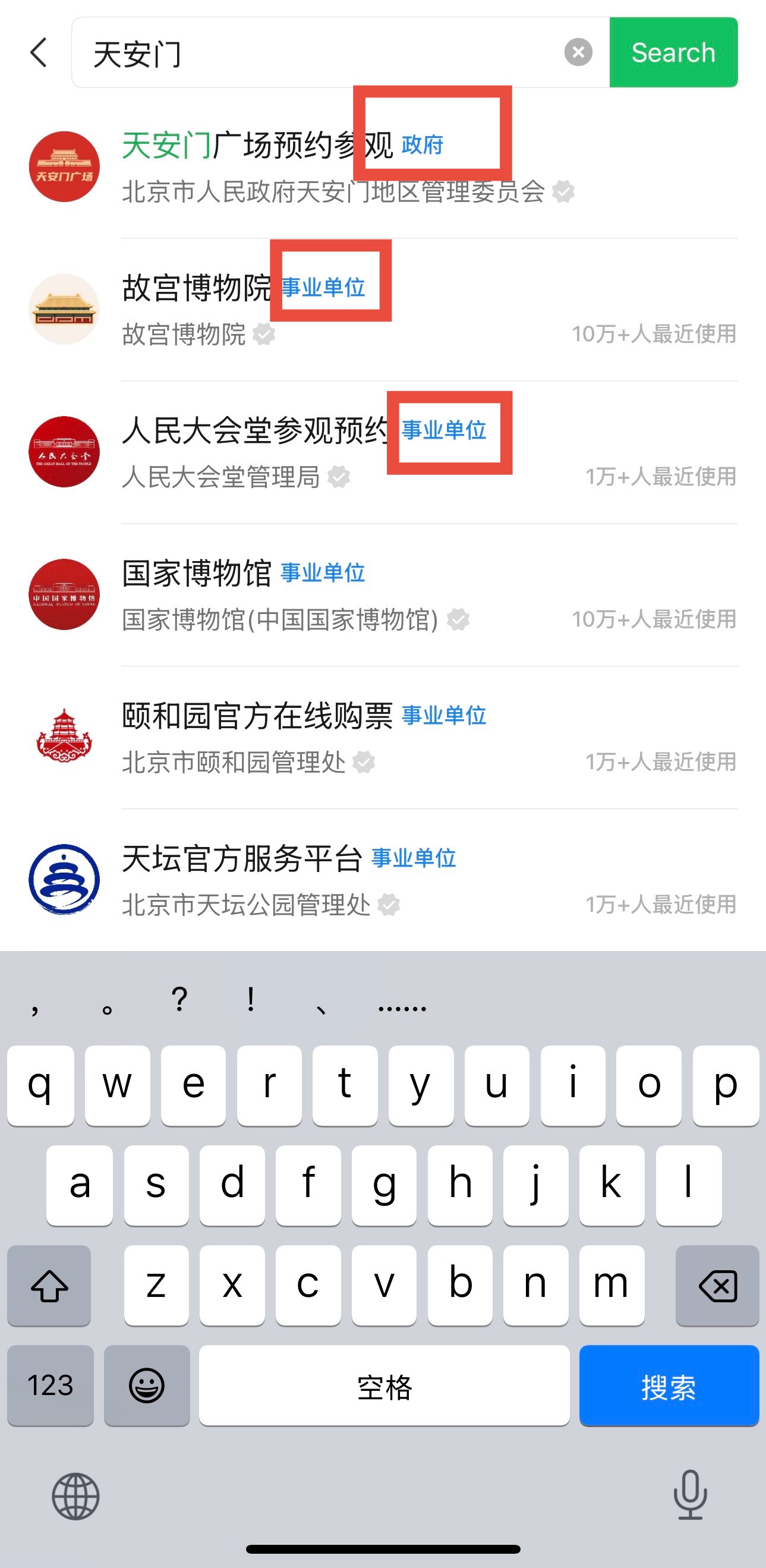
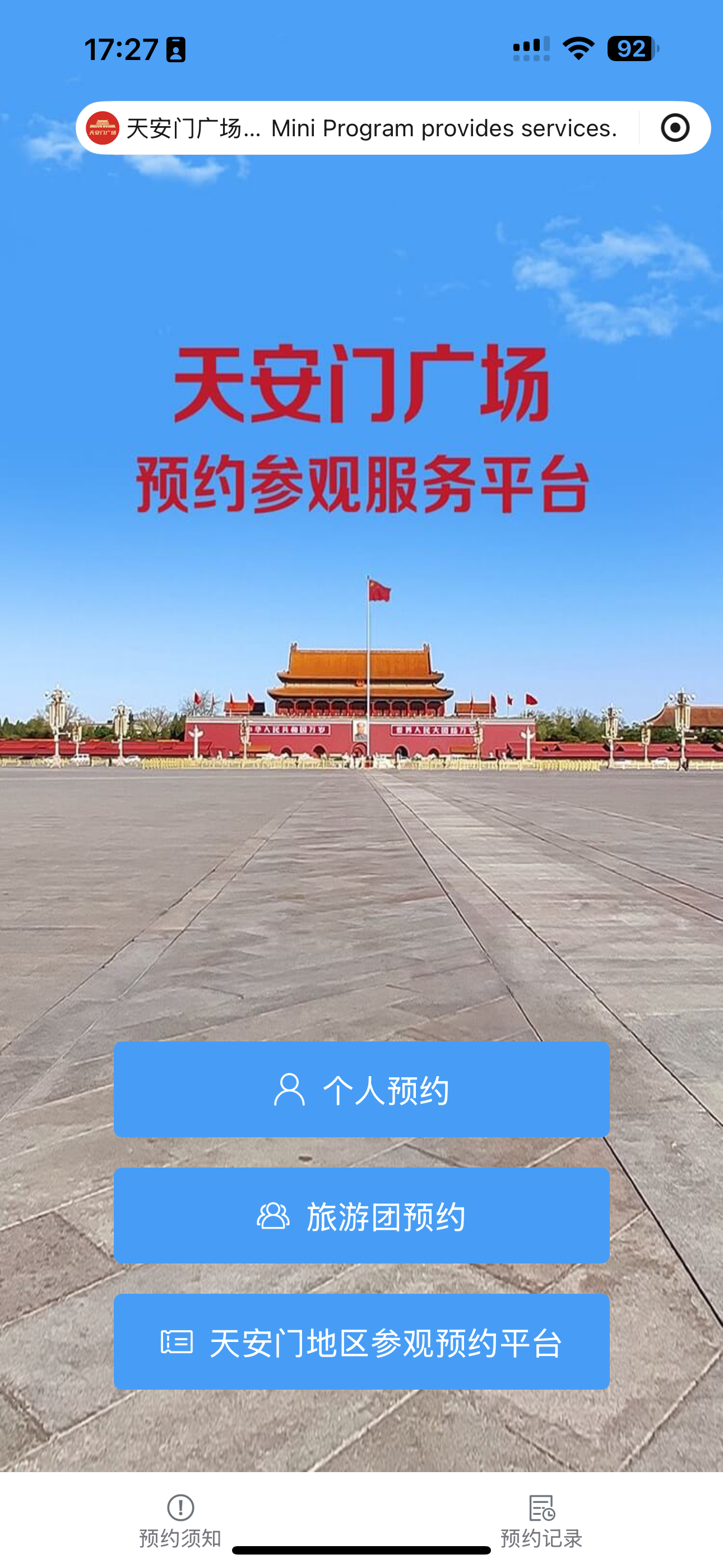
It all happens inside WeChat or Alipay. Each attraction has its own "mini-program" — a tiny app-within-an-app. This guide teaches you how to find and use them.
Top 10 Attractions: Booking Cheat-Sheet
The 10 most-asked-about spots in China — and the ones with special, unforgiving rules. Search the exact Chinese name below (copy-paste it), look for the Blue V, and follow the drop time. Everything else in China books the same way — just a normal 7-day window.
| Attraction |
Official Mini-Program (search this) |
Book Ahead |
Tickets Drop At |
Key Rule / Passport Note |
Forbidden City ★ hardest 故宫博物院 · Beijing |
故宫博物院 |
7 days |
20:00 (8 PM) daily |
~40k slots/day, gone in minutes. No on-site sales. Entry via Meridian Gate only. Book the main palace + optional treasure/garden tickets separately. |
National Museum ★ hardest 中国国家博物馆 · Beijing |
国家博物馆 |
7 days |
17:00 (5 PM) daily |
Free, but you MUST reserve. Slots vanish in seconds. Bring passport + reservation QR; bag check is strict. |
Terracotta Army ★ hard 秦始皇帝陵博物院 · Xi'an |
秦始皇帝陵博物院 |
8 days |
~ 17:00 (verify in-app) |
Official name covers both the pits and the mausoleum. One ticket, two sites, same day. Verify exact drop time in the program. |
Giant Panda Base ★ hard 成都大熊猫繁育研究基地 · Chengdu |
成都大熊猫繁育研究基地 |
7 days |
Opens 07:30 gallery time |
Split morning / afternoon sessions; morning sells out first. Go early — pandas are most active before 10 AM. North gate = pandas, south gate = newborns. |
Badaling Great Wall ★ medium 八达岭长城 · Beijing |
八达岭长城 |
7–10 days |
Rolling release |
Pick a time slot (avoid holiday peaks). Cable car + ticket are separate. Mutianyu is the easier, prettier alternative. |
Summer Palace ★ easy 颐和园 · Beijing |
颐和园 |
7 days |
Rolling release |
Park entry + through-ticket (联票) for inner halls. Usually available — book the morning before. |
Temple of Heaven ★ easy 天坛公园 · Beijing |
天坛公园 |
7 days |
Rolling release |
Cheap park ticket vs through-ticket (联票) for the Hall of Prayer. Easy to get — book same week. |
Shanghai Museum ★ medium 上海博物馆 · Shanghai |
上海博物馆 |
7 days |
~12:00 (verify in-app) |
Two buildings need separate reservations: the People's Square branch and the East (东馆) branch. Book both if you want both. |
Huaqing Palace ★ easy 华清宫 · Xi'an |
华清宫 |
7 days |
Rolling release |
Often combined with Terracotta on a Xi'an day trip. Hot-spring heritage site; evening show needs a separate ticket. |
Zhangjiajie Forest Park ★ medium 张家界国家森林公园 · Hunan |
张家界旅游 |
7 days |
Rolling release |
Multi-day pass (most visitors do 2–3 days). Pick your entry gate (East/West) — they're far apart. Cable cars separate. |
⚠️ Drop times shift with season and holidays (National Day in Oct and Spring Festival are brutal — book the instant windows open). Always confirm the exact release time inside the official mini-program the day before. This table was verified August 2026.
ℹ️ The Other 90%
Lakes, city walls, gardens, temples, and most provincial museums simply open a 7-day calendar you can grab any time. Use the same four steps — you just won't be racing the clock. No need to memorize anything; copy the Chinese name, find the Blue V, book.
Common Mistakes & FAQ
The stuff that actually goes wrong for first-timers — and the questions I get every week.
⚠️ Mistake 1 · Name order flipped
Surname and given name in the wrong boxes. The gate scanner matches your passport exactly — a mismatch = no entry. Always mirror the passport's
Surname / Given name fields.
⚠️ Mistake 2 · Wrong phone number
Some programs text a confirmation to a +86 number. If you only have a foreign number, use your
hotel's front-desk number — they'll hold the message. Or grab a local eSIM (guide linked below).
⚠️ Mistake 3 · Paid but didn't screenshot
Payment succeeded, you closed the app, and the gate has no signal. Always
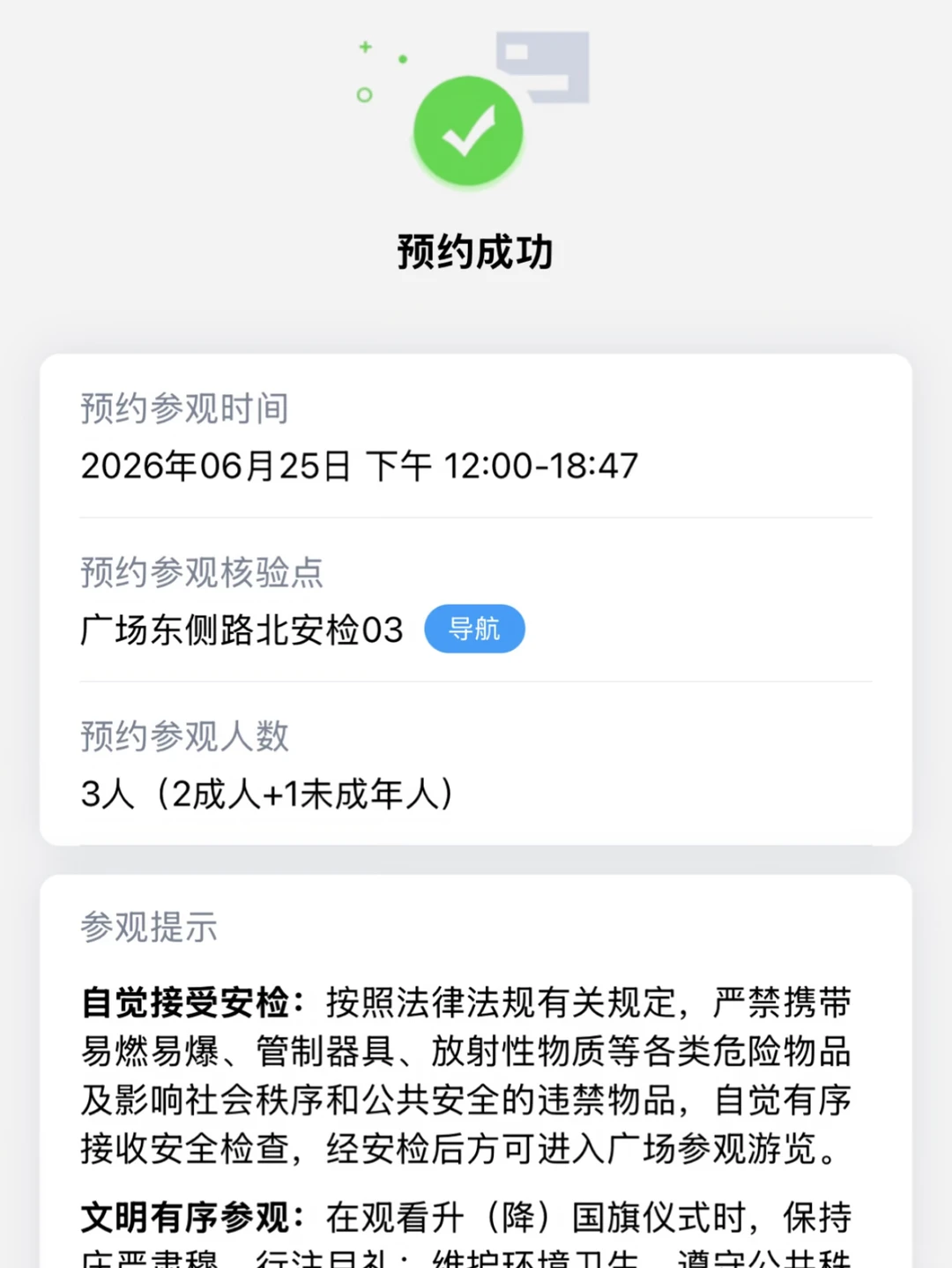
screenshot the reservation QR the second you see "成功." A saved image beats a spinning loader.
⚠️ Mistake 4 · Booked the wrong branch
Shanghai Museum, the Pandas, and Zhangjiajie all have
multiple entries/branches with separate reservations. Double-check which one you picked before paying.
Can I just buy a ticket at the gate? ▼
For the top spots — almost never. The Forbidden City, National Museum, Terracotta Army, and Panda Base are reservation-only, no walk-up sales. Smaller parks may sell at the gate, but booking ahead is always safer and often cheaper. Don't gamble your one day in Beijing on a hope.
Do foreigners really need to reserve, or is that just for locals? ▼
Everyone, including foreign passport holders, must reserve — the real-name system applies to all visitors. In fact, booking with a passport is often easier because you skip the domestic ID queue. Some spots even have a separate foreign-visitor channel.
Passport number or name in Chinese — which do I enter? ▼
Enter your name in Latin letters exactly as on the passport (Surname / Given name in the right boxes), and your passport number with no spaces. Never enter a Chinese translation of your name — the scanner reads the machine-readable zone, so it must match the English on the document.
Do I need to print or collect a physical ticket? ▼
No. Show the reservation QR on your phone + your physical passport. Staff scan both; that's your ticket. Keep the passport on you the whole visit — random checks happen.
How many people can one WeChat/Alipay account book? ▼
You can add multiple saved visitors (family/friends) and book them all in one order — just enter each person's passport info in Step 3 first. Limits vary by spot (often 5–10 per account per day), but a normal group is fine.
I typed my passport number wrong. Can I fix it? ▼
Usually you must cancel the order and rebook (refund the wrong one first). Some programs let you edit visitor info before payment only. If it's already paid and the slot is gone, contact the spot's official mini-program customer service — response is slow, so double-check before you pay.
What if tickets are sold out? ▼
Three tricks: (1) Refresh at off-peak hours — spots release a few returned tickets through the day. (2) Try the other platform (WeChat vs Alipay). (3) Book a guided-tour ticket via the official channel, which sometimes holds separate inventory. Last resort: go very early and ask the on-site service desk about same-day returns.
Can I cancel or change the date? ▼
Most programs allow free cancellation up to the day before (refund to your original payment). Changing the date means cancel + rebook — and the new date may be sold out. Read the refund rule on the booking page; some cheap tickets are non-refundable.