💳
Payment Guide · 支付宝设置

How to Set Up Alipay as a Foreigner

China is almost entirely cashless — street food stalls, taxis, supermarkets, temples. Everything runs on QR codes. My friend Kory couldn't pay for dinner on her first night because she assumed her credit card would work. But the store waitress said 'Please use your Alipay to pay for your bill, we dont have the credit card machine'. Set this up before you fly and you'll never have that problem.

⏱ 5 min setup 📅 Updated July 2026 ✅ Works with Visa & Mastercard
1
Download
Get the Alipay app from App Store or Google Play
2
Sign Up
Register with your international phone number
3
Verify
Complete real-name verification with your passport
4
Bind Card
Link your Visa, Mastercard, or other international card

1

Download the Alipay App

  1. 1 Open App Store (iPhone) or Google Play (Android)
  2. 2 Search for "Alipay" — look for the blue 支 icon
  3. 3 Tap "Get" or "Install" and wait for the download
  4. 4 Open the app — the welcome screen will appear
💡 Kat's Tip
Make sure you have a stable network connection. The app is about 200MB.
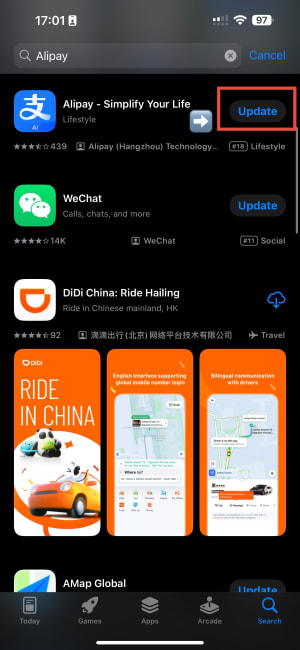
Alipay app in App Store

2

Create Your Account

  1. 1 Tap "Sign Up" on the welcome screen
  2. 2 Select your country code (e.g., +1 for USA, +44 for UK)
  3. 3 Enter your international phone number
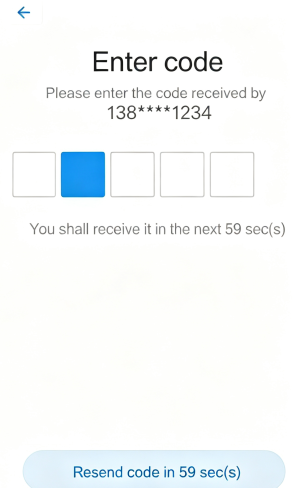
  4. 4 Enter the SMS verification code you receive
  5. 5 Set a secure password (6–20 characters)
⚠️ Important
Use a phone number you can receive SMS on. A Chinese number is NOT required — any international number works!
Alipay Sign Up screen
Alipay Enter Code screen

3

Real-Name Verification

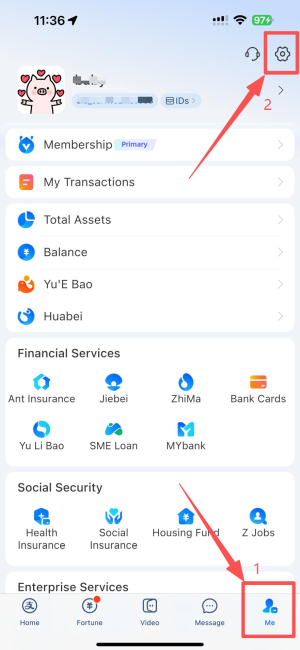
  1. 1 Go to "Me" tab → tap your profile picture
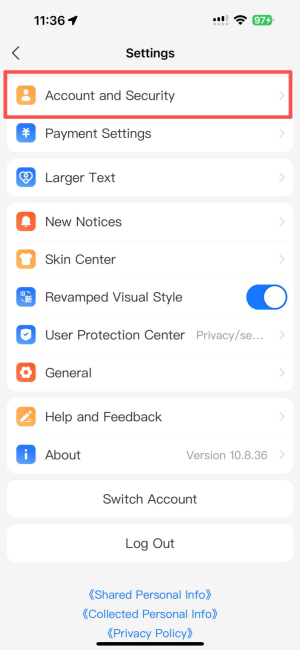
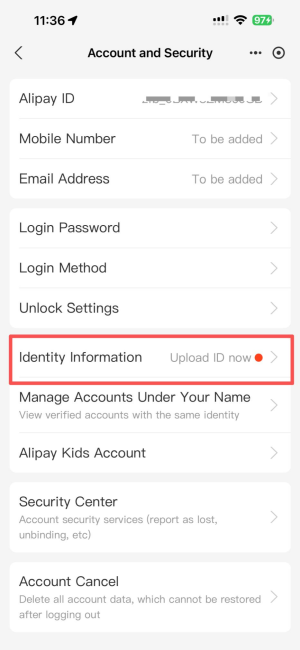
  2. 2 Select "Identity Verification" or "Real-Name Auth"
  3. 3 Choose "Passport" as your ID type
  4. 4 Take a clear photo of your passport info page
  5. 5 Complete face recognition (follow the on-screen prompts)
🕐 Processing Time
Verification usually takes a few minutes to 24 hours. You'll get a notification when approved. Don't worry if it doesn't happen instantly — it almost always goes through.
Me tab in Alipay app
Alipay Settings screen
Alipay Account screen

4

Link Your Bank Card

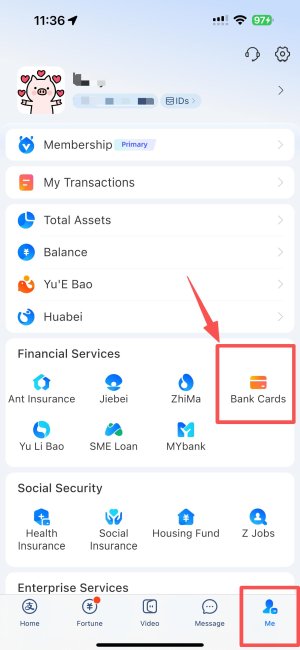
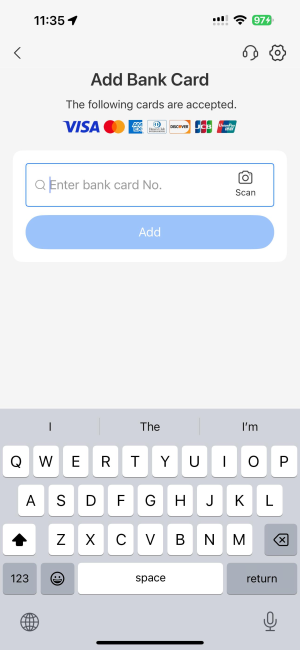
  1. 1 Go to "Me" → "Bank Cards" → "Add Card"
  2. 2 Enter your card number manually or scan it with your camera
  3. 3 Fill in your expiry date and CVV/CVC code
  4. 4 Enter the SMS verification code sent by your bank
  5. 5 Set a payment password for security
💳 Supported Cards
Visa, Mastercard, Diners Club, Discover, JCB, and most major international cards are supported. AmEx sometimes has issues — Visa and Mastercard work most reliably.
📱 Before you bind
Let your bank know you're travelling to China so they don't flag the Alipay verification as a suspicious transaction. A quick call or app notification takes 2 minutes.
Alipay Bank Cards screen
Alipay Bank Card screen

✅

You're All Set!

You can now scan QR codes, pay at restaurants, ride public transport, shop online, and enjoy cashless life in China with Alipay.

📲
QR Payments
Scan to Pay
🚇
Transport
Metro & Bus
🛍️
Shopping
Everywhere
🍜
Food
Restaurants

📥 Get the Full PDF Guide

A clean, printable version of this guide with all screenshots — perfect to keep on your phone for reference when you're in China. I'll also send you updates when Alipay changes its setup process.

✅ Got it! Check your inbox — I'll send the PDF shortly.
No spam. I read every email personally.
✅ Last verified August 2026 by Kat — always double-check official sources before you travel.